
The Hidden Power of wget: More Than Just a Download Command
🗓️ May 23rd 2025 ⏱️ 6-minutes read
🗄️ Tech
🏷️ Bash commands, Linux, terminal
If you’ve ever tried to download something through the terminal just to look cool in front of yourself (guilty 🙋♂️), chances are you’ve come across this mysterious little command called wget. And honestly, before you jump to conclusions — no, it’s not just some ancient Linux spell that hackers use in dark rooms with LED lights. Although… it does make you feel like one, not gonna lie.
When I first learned about wget, I thought it was only helpful for downloading files. You know, the usual stuff — PDFs, images, that one suspicious ISO file that you hoped wasn’t a virus. But the more I got into shell scripting (partly because of real curiosity and partly because I was procrastinating doing anything serious), the more I realised this command has layers. Like an onion. Or Shrek. Whichever reference you prefer.
But before I go full nerd mode, let me give you a bit of context.
A while ago, in the middle of trying to learn shell scripting properly, I decided to take on this tiny project — you know, one of those “let me just try something simple” projects that ends up turning into a detective case.
The plan was straightforward:
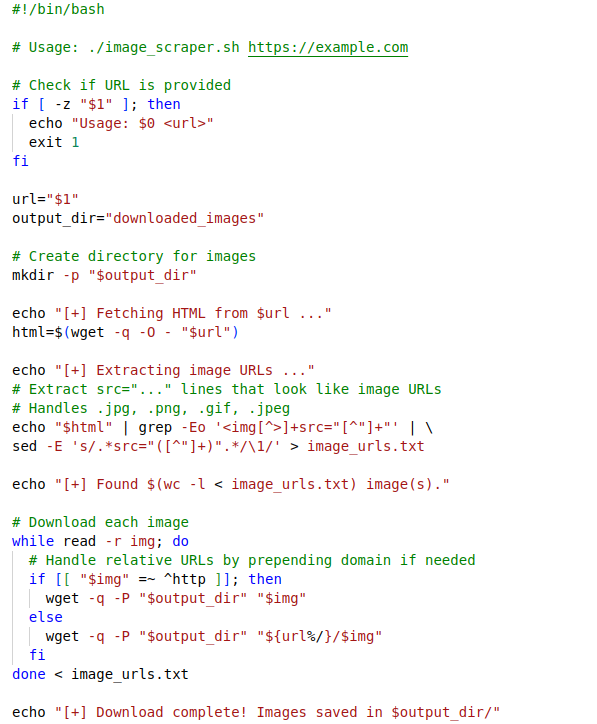
→ Write a shell script that takes a URL and downloads all the images from that page.
Sounds easy enough, right?
Well… theoretically, yes.
Practically, I ended up debugging like my life depended on it.
I still remember looking at the script at 3AM, wondering why the output file was as empty as my social life. Eventually, after going through multiple failures, editing, re-editing, blaming the universe, and questioning every life choice that brought me to that moment — it worked.
Like magic.
Like actual sorcery.
Images downloaded, URLs extracted, and I sat there feeling like I’d just hacked NASA.
(It was just some jpgs, but let me have that moment.)
And that project is exactly when I realised — wget is not just a download tool. It’s a gateway. A free passport into doing small-scale web scraping, automation scripts, scheduled downloads, mirroring entire websites, and honestly, anything you can think of if you’re slightly unhinged like me.
💡 So What Makes wget So… Powerful?
Let me break it down the way I understood it — not the textbook version, but the “I struggled so you don’t have to” version.
1. It can download entire websites—literally.
Just give it a URL and some flags and boom, it mirrors pages, subpages, images, scripts… basically everything except the moral support you need during debugging.
2. It works completely in the background.
Close your terminal. Walk away. Go live your life.
wget will silently hustle for you like that one coworker who never complains.
3. It has options for retries, limits, timestamps, cookies, user-agents…
It’s like one of those people who look basic from the outside but secretly has 47 hidden talents.
4. And best of all — it plays beautifully with shell scripting.
Which is exactly where that tiny project of mine came to life.
🛠️ A Tiny Peek at What I Built
Here’s the gist of what my script did:
• You give it a URL
• It uses wget with specific flags to fetch the HTML
• It extracts every image link
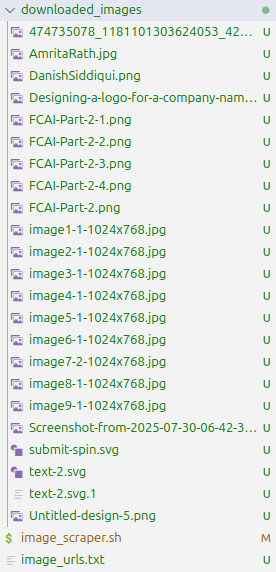
• Downloads them
• And writes the URLs and filenames into a neat .txt file
Basically a mini web scraper — except the tool doing all the heavy lifting was wget.
Sure, it wasn’t perfect, and half the internet today blocks scraping faster than Liverpool blocks goals (or not — depending on the week 😬), but as a learning experience? Absolutely worth it.
In fact, this one simple thing made me appreciate how underrated command line tools are. We always chase big frameworks, fancy libraries, cloud tools with dashboards that look like spaceship controls… but sometimes, the most reliable magic lies in a 1990s-era Linux command you barely paid attention to.

We always think of learning as a process including — buying a course, doing a certification, following a roadmap… but sometimes all it takes is one small experiment with something as simple as wget to open your mind to everything you can build. That’s what this little project did for me. Made me realise that sometimes the “boring” commands we overlook are actually hiding superpowers. You just have to poke them a little. Anyway, before I go off-track again (which is 100% going to happen if I keep writing), let me just say — if you’re learning shell scripting or just curious about how things work behind the scenes, try playing around with commands like wget. Not because it makes you look like a hacker… but because you might just discover something unexpectedly cool. And trust me — once your script runs successfully after so much struggling, it feels like a wizard. 🧙♂️✨